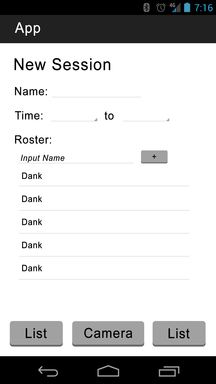
The purpose of the app is to create an easy to use attendance tracker.
Users will be able to add people to a roster, and from there, be able to record attendence.
The innovation comes from the fact that each person in a roster will be assigned a unique qr code in which the application will generate.
From there the app will generate pictures, which will be printed out on to paper. To take attendance, the student can show the instructor the qr code, and he/she will be scanned in.
But there is more. The instructor will be able to ask the whole class to hold up there qr codes.
From there, the instructor can use the camera feature and sweep the room, recording everyones attendance. The application uses the actual clock. So instructors can set
time thresholds and absenses.
The user starts at this screen, ready to take attendance!
The user starts by adding a session and a roster.
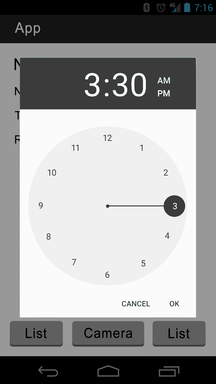
The user will set what time are students present, late or absent.
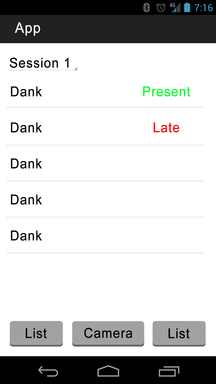
Once the session is created, here is what a session looks like.
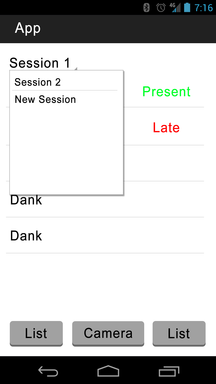
Sessions can be switched via drop down menu.
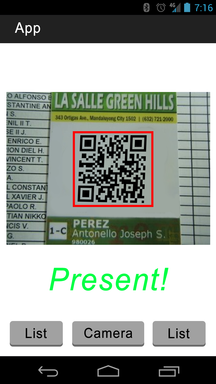
When the user is ready to take attendence, they will use the camera.
From the start screen, the user can create tables for a class by entering student’s names as well as name of the class, and start and end times of the class.
The data tables will be created with SQLite, and when student attendance information is needed, a query to the SQLite database will be sent.
By selecting the Camera
option at the bottom of the screen the app will connect to the camera on the phone, it will also use the QR reader feature built into the app.
By taking pictures of a given QR code, a query will be sent to SQLite, the QR code , which will be the unique key will be matched to the corresponding student in the data table.
The app will then merge this with another table containing the attendance data and update the attendance data for that student.
Data is at the center of this project. The main goal of the app is to save attendance records, which will be done using SQL tables.
Each class/extracurricular activity will have the names of each student saved in a table, along with the image that corresponds to them.
All together, the fields in the tables will be Name,
Picture Code
and then a series of dates, each date being each day the user takes attendance.
Each new date field is generated every time the user takes attendance. The name of each table will be Attendance_Class, with the name in class
being the name the user enters when entering a new class.
Each table will be dynamic, meaning that it will be edit and updated often. It will be edited each time a user takes attendance.
When a user takes attendance, a new column will be added to the table (with the date of attendance being taken) and the boxes in that column will each have OnTime, Late, or Absent in them if the student is present.
This entire table will also be visible to the user after each attendance session, so that the user can see which students were present and which were absent.
The main key, which will be used to search the table for entries, will be the student’s name (both first and last name will be in a single column).
This key will be used to find students and either report their specific attendance or delete them, in the case that they are removed from the class.
The picture code
column will be used sort of as a key as well (although it is not the official key) during the attendance taking, as the app will search for a picture code
that is the same as the student’s code that is being scanned. A sample of how a table in the app will look is below.
| Name(Varchar) | Picture Code(Varchar) | 12/7/16(Enum) | 12/8/16(Enum) | 12/9/16(Enum) |
|---|---|---|---|---|
| Harrison Giovannelli | OnTime | Absent | OnTime | |
| Nam Mannucci | Absent | Absent | Absent | |
| Nick Luong | Absent | Late | Late | |
| Alex Mazon | OnTime | Late | OnTime |
Surface Views, Spinners, Clocks, Intents and other basic android content.
Although if we had to define one thing that could go wrong is the image recognition, which is the main focus of our research.
| Component | Scenario | Scenario Description | Event or Process by Design | Expected Result |
|---|---|---|---|---|
| Use Camera | 0.1 | Camera Takes a picture of the QR code and its readable | Retrieves Student from Database with the assigned QR code. Checks the time to see if person is within the time limit | Will receive a present or late depending on when he sends it in |
| Use Camera | 0.2 | Camera Takes a picture of something unreadable or QR Code isn’t legit | Returns an error and will ask to re-take a picture | Ask to retake a picture |
| Create New Session (Class roster) | 1.1 | Class isn’t given name | Returns error, asks to enter name for class | Ask to enter Class name |
| Create New Session (Class roster) | 1.2 | Class isn’t given start or end times | Returns error, asks to enter name for class | Ask to enter Class name |
| Create New Session (Class roster) | 1.3 | No student objects added to class roster | Returns an error, asks to enter at least one student object | Ask to enter at least one student object |
| Create New Session (Class roster) | 1.4 | User tries to view a class that does not exist | App searches for class in data tables.If table does not exist, app does not return a table and sends user a message | App returns a message telling the user that the requested class does not exist. |
| Create New Session (Class roster) | 1.5 | User tries to create a class with a name that already exists | App searches for class in data tables. If table with the same class name exists, app does not create a table and sends the user a message | App returns a message telling the user that the class they tried to create already has an attendance file. |
| Check list of Attendance | 2.1 | Doesn’t show the list | Returns an error, will say that Session doesn’t exist or is empty | Ask the user to create a session |
| Check list of Attendance | 2.2 | Shows the wrong list | Will show a different list from what the user wanted | Allow user to edit the database |
| Check list of Attendance | 2.3 | Loads the list from SQL and everything is fine | Will show a different list from what the user wanted | Everything is fine |
| Editing students (deleting/ adding students to classes) | 3.1 | User tries to add a name that already exists in the class | App searches for student in the class using name key. If student already exists, app does not add student and sends a message | App tells user to add student with different name (i.e. add a middle name) and allows the user to try again |
| Editing students (deleting/ adding students to classes) | 3.2 | User tries to delete a student that does not exist | App searches for student in the class using name key. If student does not exist, app does not delete any students and sends a message to the user | App returns a message telling the user that the requested student does not exist. |
Finish GUI and Start Research
Animate and Wire GUI to code
Finish SQLite Database querys
Get image recognition working